Built with this method · 12 October 2026

From a paper sketch to a live AI app. One evening.

Paper.→Pushback.→Production.

On a Monday evening I drew JobFuture AI on a sheet of paper, gave the photo to Claude with one rule, argue with it before you write anything, and shipped it before midnight. The whole build was recorded. This page is the proof, the episodes, and the documents.

~45 minplanning with Claude, before any code
7:02 pmfirst commit · 41 commits by 11:25 pm
< 5 hfrom the first Cursor prompt to a live site

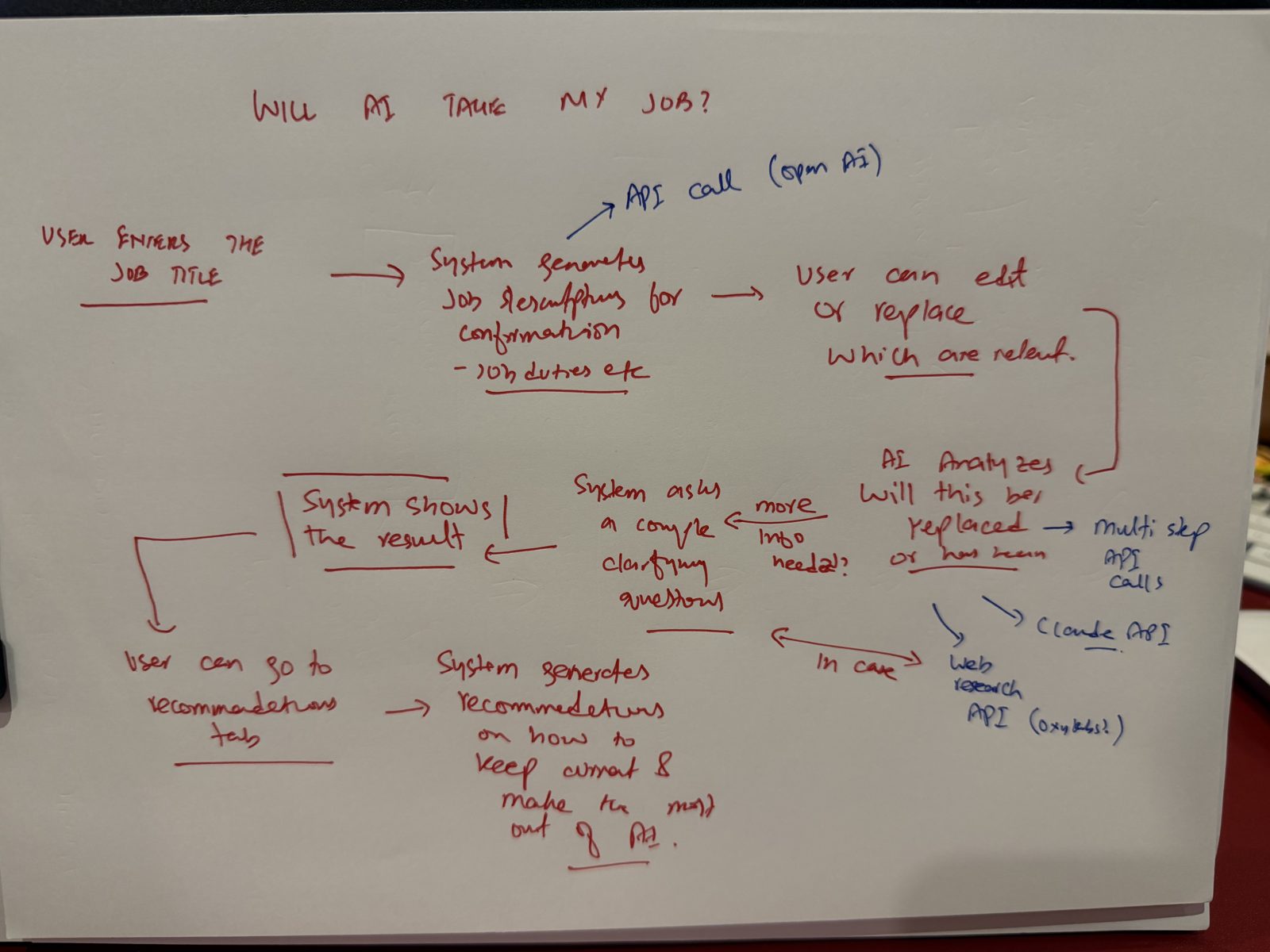
The paper sketch of JobFuture AI
the page, 12 Oct 2026
no stack, no screens, no model names. those are decisions.
Watch

The whole build, step by step.

Six episodes, one per step. Narrated, with the waiting sped up and nothing else skipped. The exact prompts and answers are on screen. Keys, ids and anything private are blurred.

The short version · 90 seconds

From a paper sketch to a live AI app. One evening.

Paper, pushback, production. The page, the planning chat, Cursor and Claude Code, the deploy, the live site.

Episode 1 · Step 1–2

Paper to Claude

The page, the first prompt, the honest-advisor skill, picking the stack, stopping the model at the flow, and the gap list. Everything before any code.

Episode 2 · Step 3

Architecture and scale

The system map, the AI context architecture, the decision I hadn't made, and the question that found three real gaps: what happens at 1,000 users?

Episode 3 · Step 3–4

The router

One what-if that cut most of the model calls without cutting quality. Claude agrees, then designs it. Fewer tools. Version three.

Episode 4 · Step 5

PRD, design system, roadmap

Four documents before Cursor opens: the ask, Claude asking back, the PRD with seventeen build prompts, the design system, the roadmap.

Episode 5 · Step 6

Building in Cursor, prompt by prompt

Agent mode with a plan, tests after every prompt, limited access, a hand-off file between chats, parallel agents, and the long middle.

Episode 6 · Step 6–7

Claude Code inside Cursor. Test it. Ship it.

Two tools, one repo. The landing page, a test as a user, the industry gap, AWS and the domain, and the live site.

Full build in one file: full-build.mp4 (all six episodes, with chapters in the description on YouTube).

The seven steps, as they happened

Same order. Same evening.

What each step produced on this build, with the moment from the recording.

STEP 01
Paper

Draw the page

One sheet. A job title goes in, the system drafts the duties, the person edits them, AI analyses each duty, asks a question if it needs more, shows the result, then recommendations. Arrows to an API call and web research.

Nothing on the page is a technology choice. That is the point.
The page
about fifteen minutes with a pen
STEP 02
Pushback

Read it to Claude. Make it push back.

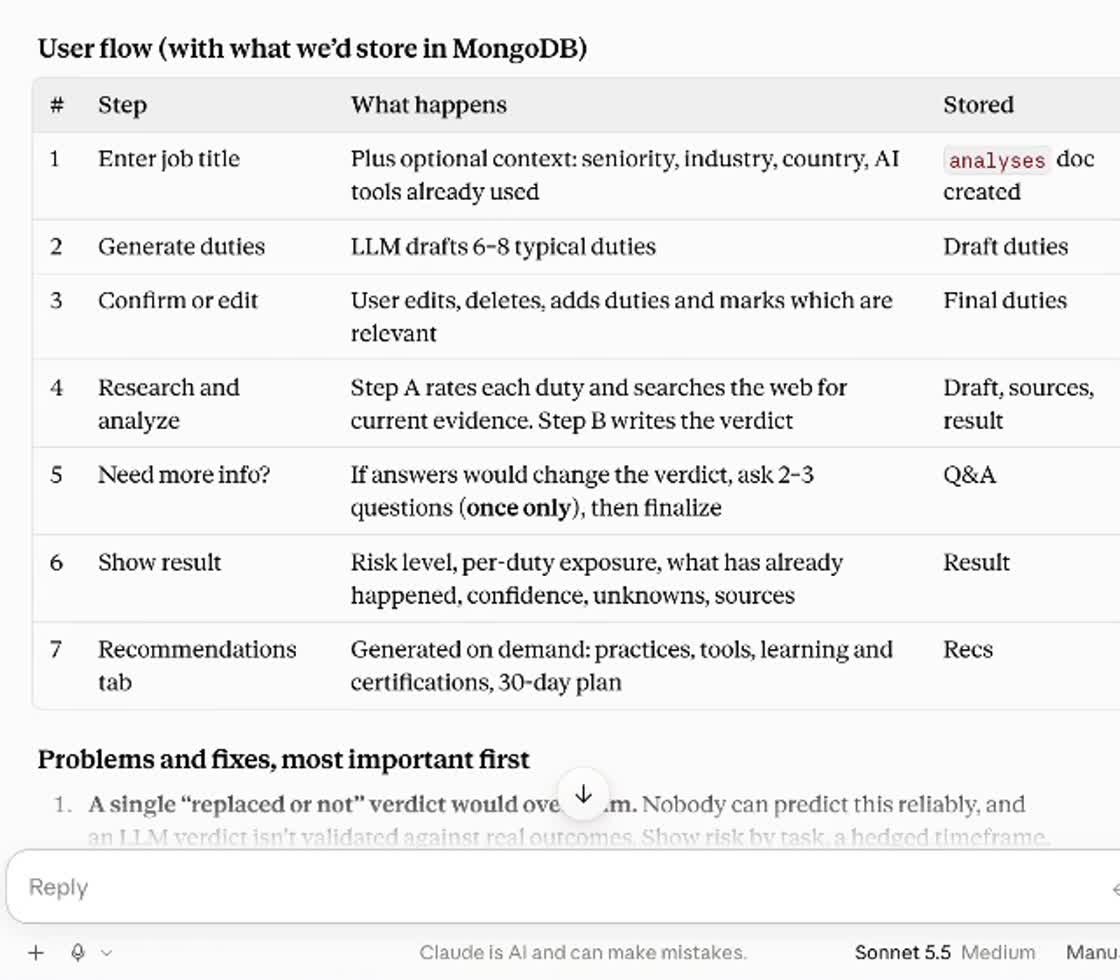
The photo, a short prompt, and the honest-advisor skill. Then: stop at the flow. Claude laid out a seven-step user flow with what we'd store at each step, and the problems, most important first.

Claude · from the sessionThe flow is sound, and the confirm-and-edit step is the strongest part. It fixes the biggest weakness of this kind of tool, which is that a job title says little about what someone actually does.

The question it never asked: which AI tools does this person already use? One line, and the flow got a new step.

The user flow table Claude produced
the flow, before any code
STEP 03
Pushback

Turn the page into an architecture

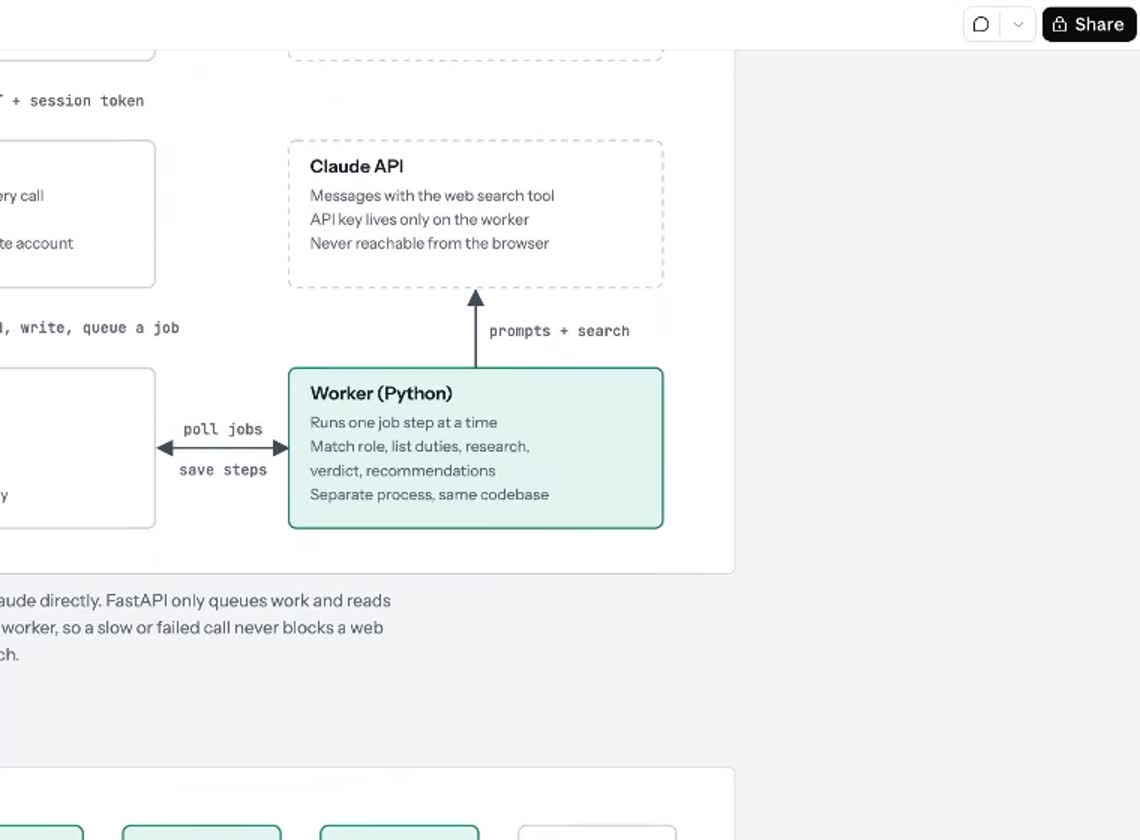
The system map: browser, Next.js, FastAPI, MongoDB Atlas, a worker, the Claude API. Then the AI context architecture: six model calls, what goes into each, what comes back, the checks our code runs on the output.

Then the question that found three real gaps: what happens at 1,000 users? A worker that handled one job at a time. Fifty people entering the same title triggering fifty identical web searches. Rate limits and spend.

Don't let AI make the decisions you haven't made.
The system map
the system map
STEP 04
Pushback

Pick the stack yourself. And the router.

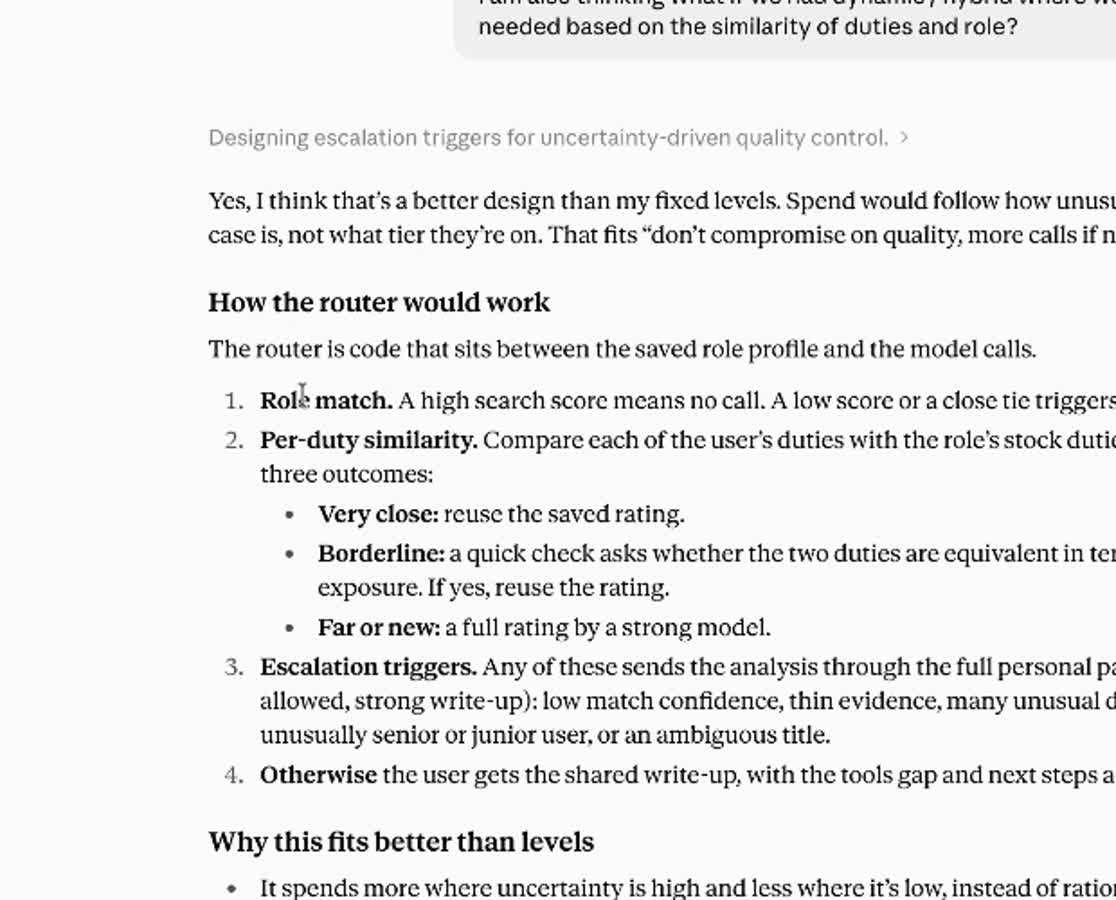
FastAPI, Next.js, MongoDB Atlas: my call, typed into the chat before Claude could suggest anything. Then the best idea in the build, from a what-if: a router that reuses a saved result when a role is close to one we've already researched, and calls the model only when it isn't. Vector search inside Atlas, no extra database.

Claude · from the sessionYes, I think there's a better design. Spend would follow how unusual the user's case is, not what tier they're on.
How the router would work
how the router decides
STEP 05
Production

Write the brief: PRD, design system, roadmap

Four documents before Cursor opened, with the security-hardening skill switched on: the AI architecture context, the system design, a PRD with seventeen build prompts inside it, and a design system. Plus a roadmap, because version one is the first step, not the product.

Cursor builds exactly what it's given. Give it the product, not just the feature.
build prompts, in order
Prompt 0 · repository, tooling and rules
Prompt 1 · backend foundation
Prompt 2 · authentication and sessions
Prompt 5 · jobs and worker
Prompt 7 · personal path and router
Prompt 9 · frontend and design system
Prompt 13 · security hardening pass
STEP 06
Production

Let it build. Review like an architect.

Cursor in agent mode, starting with a plan. Tests after every prompt, fixed while the context was small. Read-only access everywhere but one organisation. A hand-off file between chats. Grok for the basic work, Opus for the code. Claude Code inside Cursor for the heavy lifting.

From the sessionIt takes you probably two hours to build an application, and then five hours to fix that application. The first phase can be a bit tedious, but it builds you the right application.
access
read-only everywhere, by default
one GitHub organisation: read and write
never client work · domains · documents
STEP 07
Production

Ship. Then back to paper.

Used like a user first, which found the gap no model caught: it asked for a job title but not the industry. Then one small server on AWS, Docker and HTTPS, the database on Atlas, and the domain, bought that morning, attached through the registrar's API from the chat.

If only you can run it, it isn't done.
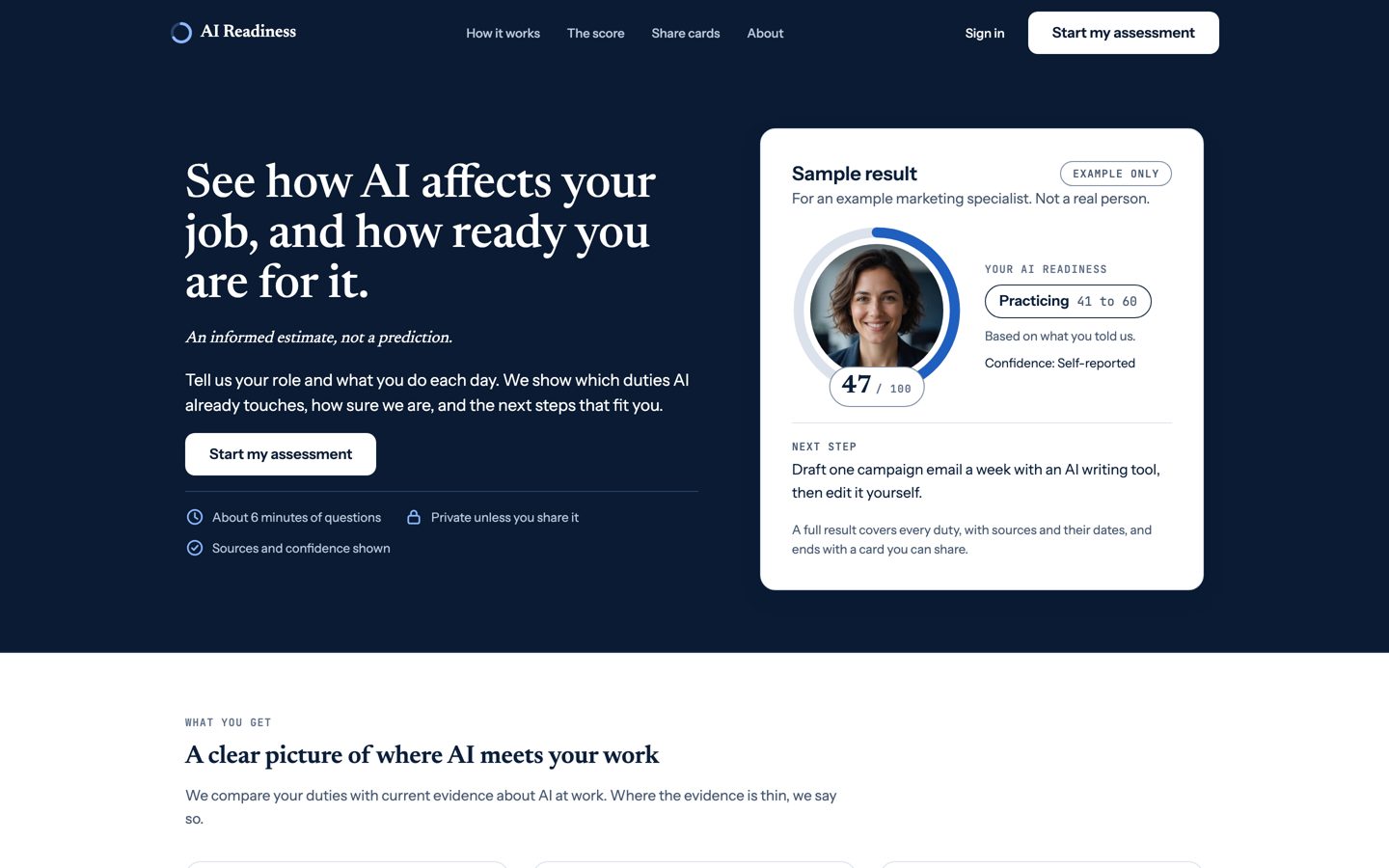
jobfutureai.com, live
jobfutureai.com, about 11:25 pm
Before any code

Decided on paper and in the chat. Not in the codebase.

StackFastAPI, Next.js, MongoDB Atlas. My call.
FlowTools and usage per duty, optional. Preset roles, free text as the fallback.
ArchitectureSix model calls, each with a schema our code checks. Every call in the worker.
ScaleAn asynchronous worker. One research per role. Rate limits and a spend cap.
CostA router in code: reuse when close, check when borderline, call the strong model when new. Quality first.
ProductSign-in before the analysis. “We don't know” is a valid result. Version one is the first step.
Take it

The documents Cursor got, and the two skills.

The real files from this build, as they went into the repo. Use them as a reference for yours.

Step 5 · the brief

The four documents

The PRD with the build prompts, the AI context architecture, the system design, the design system tokens, and the roadmap. Exactly what went into Cursor.

docs/prd.md              the PRD + 17 build prompts
docs/ai-architecture.html  six calls, the router
docs/system-design.html    the system map
docs/design-system/        tokens, components
docs/*Roadmap*.csv         the roadmap
Step 2 · pushback

Honest advisor

The Claude skill I load before the first prompt. No flattery, no bias toward my framing, no invented facts, and it flags what I didn't ask about.

honest, not agreeable
challenge assumptions · state confidence
separate fact from judgment
flag what is missing
Step 5–6 · production

Security hardening

Secure-by-default rules for the stack I use: secrets, sessions, input, headers, dependencies, deployment, AI features. Runs on every prompt in Cursor.

secure by default · fix what you find
never trade security for speed
end every change with "Security notes"
Step 1 · paper

The page, as a worksheet

Print it, fill it by hand, take a photo, read it out loud to Claude. The same sheet this build started on.

1 FLOW          arrows, not sentences
2 JOURNEY       one sentence each
3 ARCHITECTURE  draw the hand first

To install a skill in Claude: unzip it, and add the folder to your skills. The documents are shared as a reference (CC BY 4.0, credit “Sohaib Waheed, paperfirstmethod.com”).

Your next build

Start with a page.

Take the templates. Draw the page. Make the AI push back.