
On Monday 12 October I drew an app on one sheet of paper. By about 11:25 that night it was live on its own domain, with real users able to sign in.
That sounds like a story about speed. It isn't. The building took under five hours. The part that made it possible came first: fifteen minutes with a pen and about 45 minutes with Claude. None of it was code.
This is that plan.
The page
The app is JobFuture AI. You tell it your role and what you actually do each day. It shows which of your duties AI already touches, how sure the evidence is, and a readiness score you can raise.
I didn't start with that sentence. I started with a red pen and a sheet of paper, in about fifteen minutes.
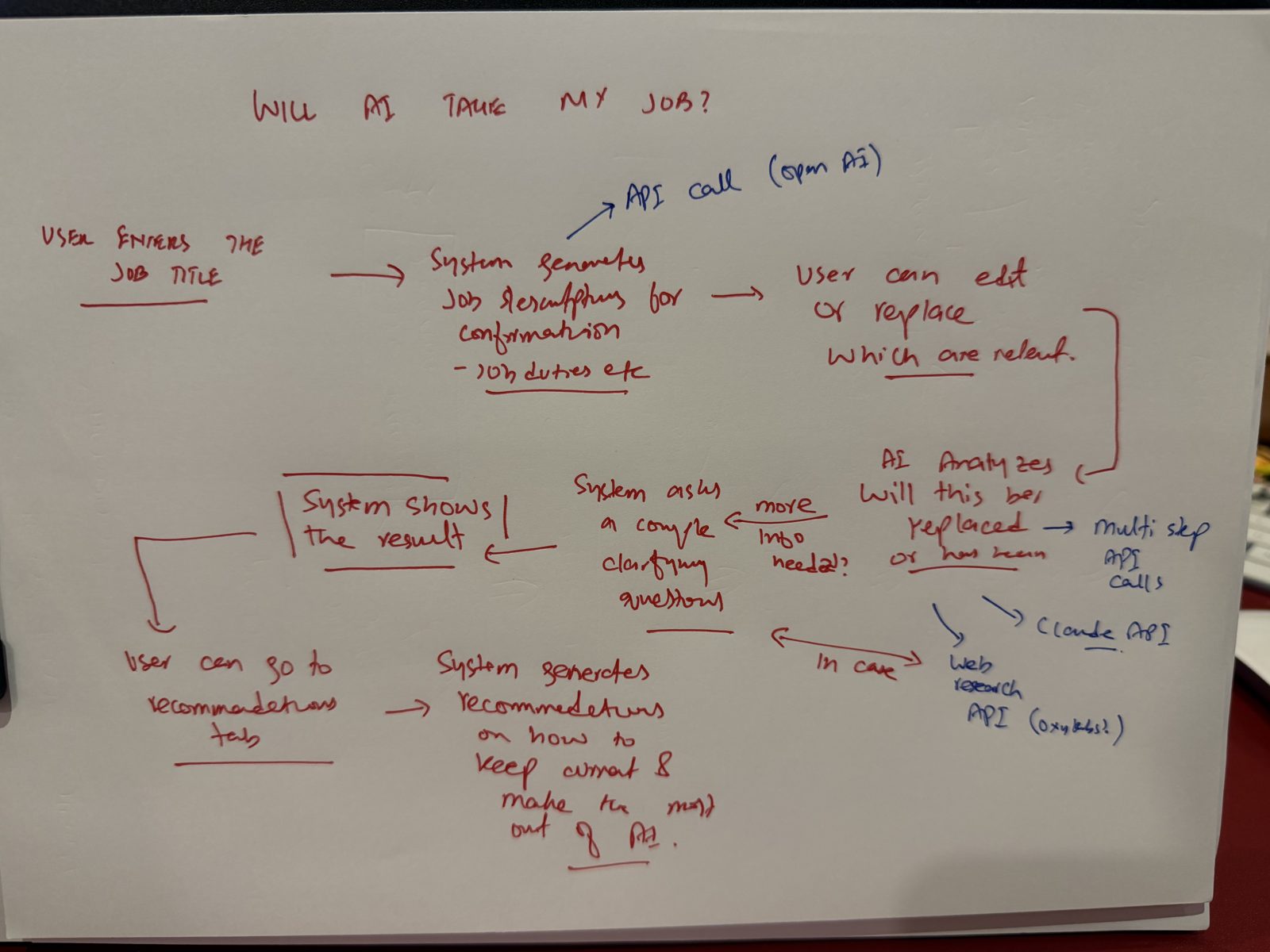
A job title goes in. The system drafts the duties. The person edits or replaces them. AI analyses each duty. If it needs more information, it asks a couple of clarifying questions. It shows the result. Then a recommendations tab.
On the side, two arrows: an API call, and web research for when the model needs current evidence.
What isn't on the page matters as much. No stack. No screens. No model names. Those are decisions, and I hadn't made them yet. The page only says what happens, in what order, and where the AI sits.
The rule I gave Claude
I took a photo of the page and gave it to Claude with one rule: argue with this before you write anything.
I also load a skill before every planning session that tells it to be honest rather than agreeable: challenge my assumptions, state its confidence, separate fact from judgment, and flag what I didn't ask about. Without that, most assistants will tell you your idea is great. Mine isn't always.
Then I asked it to stop at the flow. No architecture yet. Just the user flow, what we would store at each step, and the problems, most important first.
It said the confirm-and-edit step was the strongest part, because a job title says very little about what someone actually does. Then it asked the question I hadn't: which AI tools does this person already use? One line, and the flow got a new step.
Five questions, every time
This is the core of the pushback. I ask the same five questions on every build:
- What's missing from the flow?
- Which of these ideas is bad, and why?
- Where does it break at ten times the users, or the day the model is down?
- What happens when the AI is wrong here, and who notices?
- What's the simplest architecture that survives those answers?
A good answer to the first names a specific box. A good answer to the second names one bad idea and one reason. A good answer to the last has fewer boxes than you started with. If the answer is generic praise, push again.
What the questions caught
The question that earned its keep was number three. I asked: what happens at 1,000 users?
It found three real gaps. The worker handled one job at a time, so a queue would form the moment more than a few people arrived. Fifty people typing the same job title would trigger fifty identical web searches. And nothing was stopping the model spend from running away.
Every one of those would have been a production incident. Instead they were three lines on a page.
Then I asked a what-if. What if, when a role is close to one we've already researched, we reuse that research and only call the model when the role is new? Claude agreed, and then designed it: a router in code that reuses when close, checks when borderline, and calls the strong model when the case is new. Vector search inside the database we were already using, so no extra service.
That one idea changed the shape of the costs. Spend now follows how unusual someone's case is, not how many people show up.
The decisions I made myself
Some things I didn't hand to the AI.
The stack: Next.js, FastAPI, MongoDB Atlas. I typed it into the chat before Claude could suggest anything. Not because it's the best stack in the world. Because I know how it fails, and I'm the one who will run it.
Sign-in before the analysis, so results can be saved and the work can run in a background worker with a spend cap.
And "we don't know" is a valid result. If the evidence for a duty is thin, the app says so. An informed estimate, not a prediction.
The brief
Before Cursor opened, Claude and I turned all of this into documents: the AI architecture, the system design, a PRD with the build prompts in order, a design system, and a roadmap. The roadmap matters more than it sounds. It says out loud that version one is the first step, not the product.
Cursor builds exactly what it's given. Give it the product, not just the feature.
The evening
The first Cursor prompt went in at about 6:37 pm. The first commit landed at 7:02 pm.
Cursor ran in agent mode, starting each prompt with a plan. Tests after every prompt, fixed while the context was still small. A hand-off file between chats, so a new chat didn't re-argue decisions we'd already made. Claude Code inside Cursor for the heavier parts. Read-only access everywhere except the one place the code lived.
41 commits. Then I used it like a user, and found the gap no model had caught: it asked for a job title, but never the industry. A person found that in minutes. That's why the last step is still yours.
One small server, Docker, HTTPS, the database, and the domain. Live at about 11:25 pm. Under five hours of building.
What I'd do differently
I'd put the industry on the page. It was missing from my flow, and no amount of pushback found it, because I never drew the person in their actual workplace.
I'd also use the app like a user halfway through the build, not only at the end. A few minutes of clicking found what a whole review didn't. Halfway through, it would have found it much sooner.
And I'd write the NEVER lines before anything else in the brief. The things an AI must not do are easier to state up front than to catch later.
What I'd tell you to copy
Not the speed. The order.
Draw the page before you open any tool. Draw the hand first: the places where a human must say yes.
Make the AI argue with the page. Ask which idea is bad. Ask what breaks at ten times the users. Stop when the page is honest, not when it's pretty.
Make the structural decisions yourself. Then let the AI build inside them.
I recorded the whole evening, step by step, with the waiting sped up and nothing else skipped. The episodes, the honest-advisor and security-hardening skills and a printable worksheet are free at paperfirstmethod.com/build/. The method itself is written up step by step in the 7 steps.
Next week's Field Note is the pushback session in full: the prompt, the answers I keep, and the ones I throw away.