
Why draw the app on paper before using AI?
AI coding tools are fast at producing something plausible. They are not good at deciding what the product is. If you start in a chat box, the tool fills every gap you left with a guess. You find the guesses later, in code.
A page forces the decisions early. You can't draw an arrow without knowing where it goes. You can't draw a box for the AI without saying what goes in and what comes out. Every empty space on the page is a question you would otherwise answer three rebuilds later.
Paper also keeps the plan small. One sheet holds about as much as one person can reason about at once. If the product doesn't fit on it, it is two products.
How do I plan an app before using Cursor or Claude Code?
Take one sheet and a pen. Split it into three boxes, top to bottom.
- Flow (top). Who starts it, what they see, what they get, where it ends. Four boxes with arrows. Arrows, not sentences. If you need more than six boxes, you have two products.
- Journey (middle). Three moments, one sentence each: the first use (what makes them trust it?), the hard case (what breaks their patience?) and the day it saves them (what do they tell a colleague?).
- Architecture (bottom). A box for each service. A cylinder for each data store. A star where the AI sits. A hand wherever a human must say yes before something leaves the system.
Draw the hand first. Ask where a wrong answer would cost money, trust or someone's time, and put a hand there. The services and stores arrange themselves around those points.
When the page is done, take a photo of it. That photo is the input to step 2.
What should not be on the page?
No technology names. No screen designs. No model names. Those are decisions, and they come later, in steps 3 and 4, after the plan has been challenged. A page that says a framework or a model name in the flow box has skipped a decision instead of making it.
How do I know the page is ready?
Every box has something in it. Every arrow has a direction. There is at least one hand, or a written reason why nothing needs a human. You can explain the page out loud in two minutes without saying "and then it just works".
An empty box means you are not ready to talk to Claude yet.
What are the common mistakes?
- Writing paragraphs instead of drawing. Sentences hide gaps. Arrows show them.
- Drawing screens. A screen is how it looks. The page is about what happens.
- Leaving out the hand. If nothing needs approval, either the product is trivial or you haven't thought about what happens when the AI is wrong.
- Starting on a laptop. A document invites detail too early. A pen makes you choose.
- Making it pretty. The page is a thinking tool. Nobody else needs to read it.
Which template should I use?
The free template The page has the three boxes and the prompts for each one. If you prefer to print, the worksheet is a one-page PDF in A4 or US Letter. Fill it in by hand, take a photo, and read it out loud to Claude. Both are free under CC BY 4.0.
What did the page look like in the real JobFuture build?
On 12 October 2026 I built jobfutureai.com in one evening with this method, and recorded every step. The page took about fifteen minutes with a pen.
It was one sheet. A job title goes in. The system drafts the duties. The person edits them. The AI analyses each duty and asks a question if it needs more. Then it shows the result, then recommendations. Arrows go out to an API call and to web research.
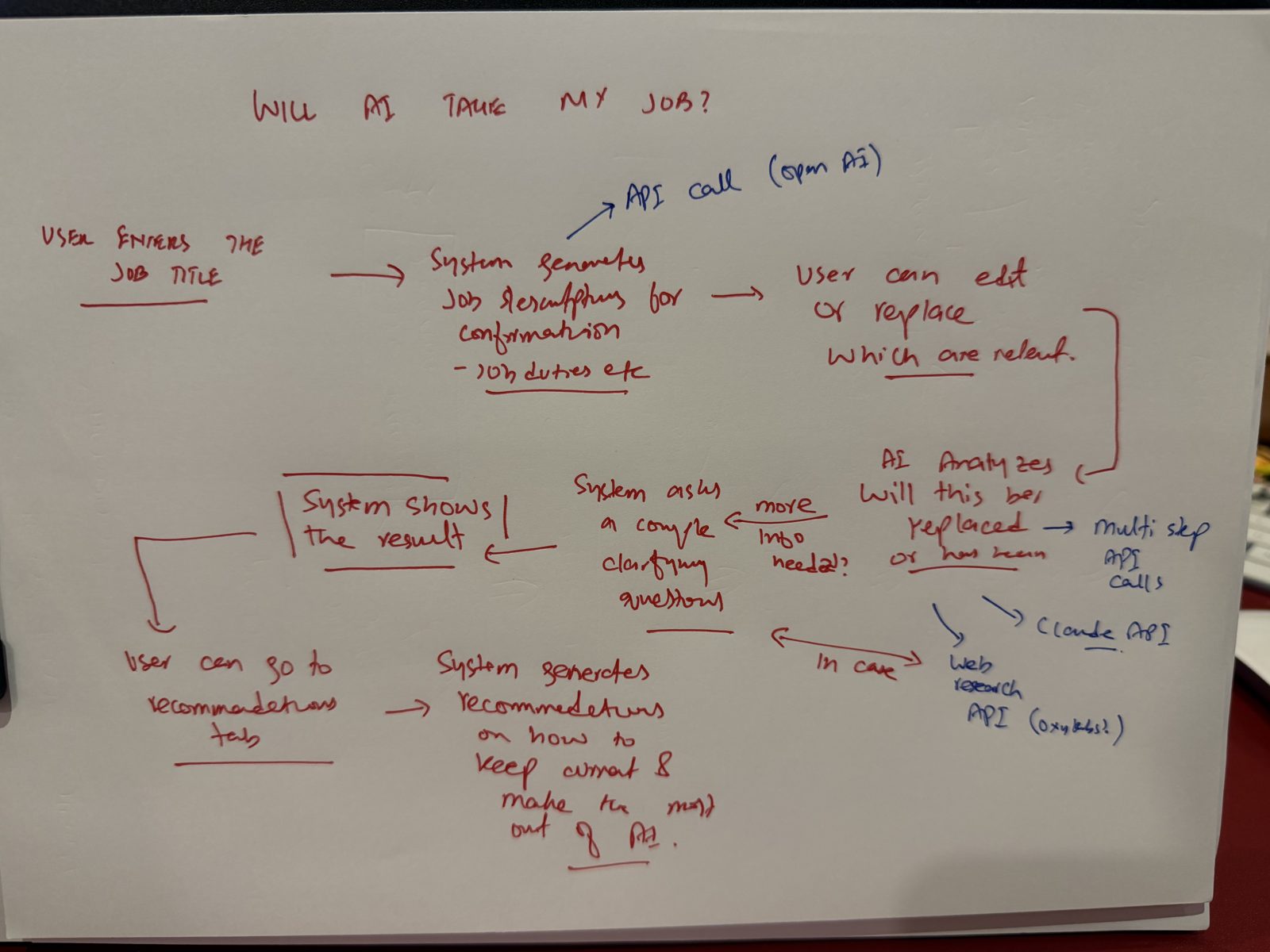
Nothing on that page was a technology choice. That was the point. The stack, the model and the screens were all decided later, after Claude had argued with the plan. See the full build.
The page
Copy it or download it. No email. Credit: "The Paper-First Method by Sohaib Waheed".